
Sound-reactive desk display
The RGB Nixie Clock
That Reacts to Your Music
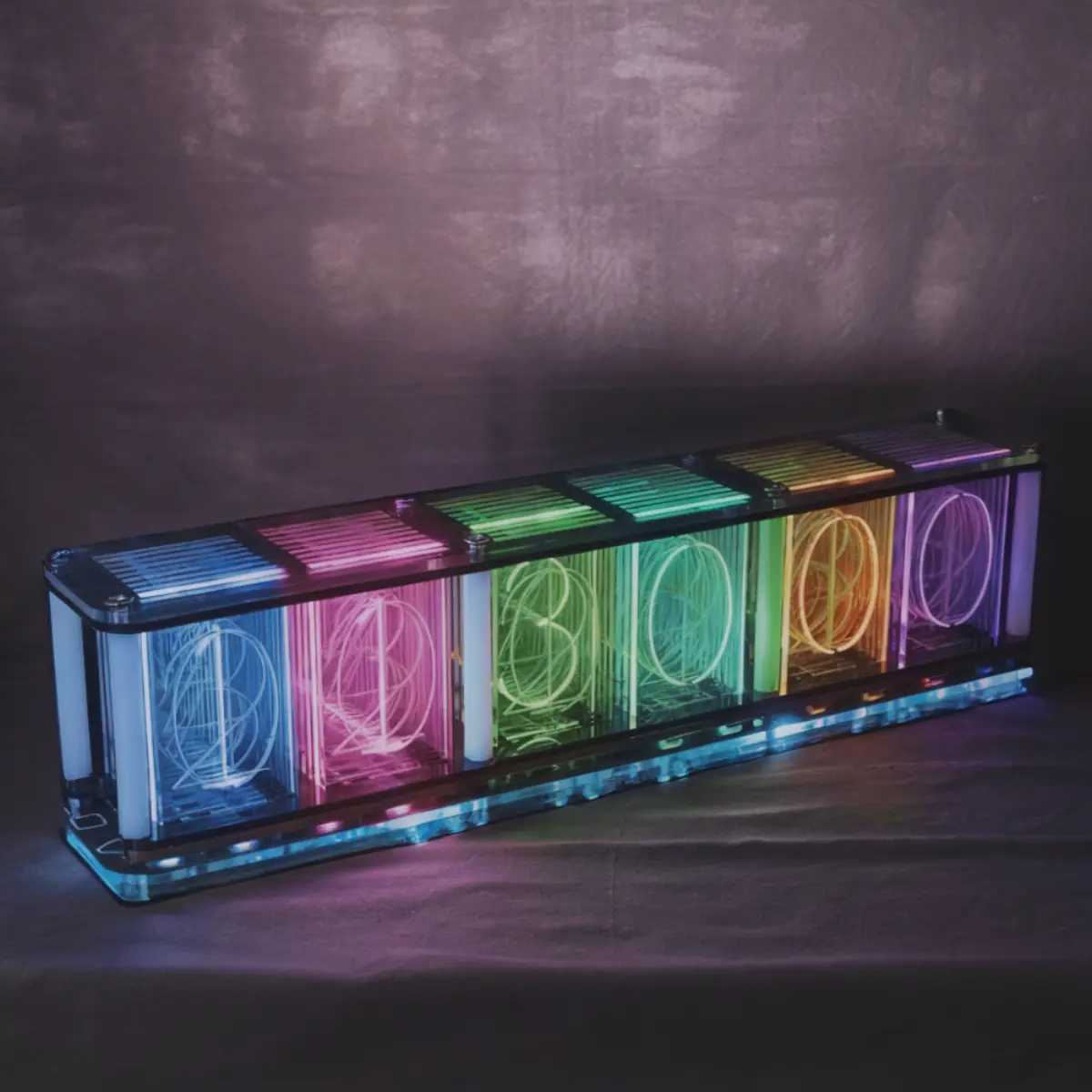
6 pseudo-nixie tubes with full RGB backlighting and a built-in mic that turns your desk into a spectrum visualizer. Ships as a DIY kit. No soldering. 30 minutes to build.
What Is a Nixie Tube Clock?
Original nixie tubes are gas-discharge displays from the 1950s-1970s. Ionized neon gas creates a warm orange glow through stacked digit cathodes visible behind glass. They're genuinely beautiful, and they're everywhere in desk setup videos on r/battlestations and YouTube.
The problem: real nixie tubes are Soviet/East German surplus. They're fragile, require 170V+ power supplies, and cost $200-400 for a finished clock. Supply is running out.
Modern pseudo-nixie clocks use LED-lit acrylic elements shaped like nixie digits. You get the layered depth and warm glow without the fragility, high voltage, or scarcity. This clock takes it further: full RGB color control and a built-in microphone that turns it into a sound-reactive music spectrum visualizer.
| Feature | This Clock | Genuine Nixie |
|---|---|---|
| Price | $69.99 | $200-400+ |
| Tube lifespan | 50,000+ hours (LED) | 5,000-10,000 hours |
| Voltage | 5V USB-C | 170V+ DC |
| Color options | Full RGB | Orange only |
| Sound reactive | Yes | No |
| Assembly risk | None (no soldering) | Moderate (high voltage) |
Six Reasons This Clock Wins the Desk
Most pseudo-nixie clocks just tell time. This one does more.
Sound-Reactive Spectrum
Built-in microphone drives 6 tubes as a real-time frequency visualizer. Bass, mids, and highs react independently to your music.
Individual RGB Per Tube
Each tube has its own RGB backlight. Match your keyboard, create gradients, or let it cycle through colors automatically.
DIY Assembly Kit
No soldering. Snap the tubes in, connect flat-flex cables, screw the housing together. Done in 30 minutes.
Clock + Temp + Date + Alarm
12/24h time, Celsius/Fahrenheit temperature, date display, alarm, countdown timer, and stopwatch. All the modes.
Clear Acrylic Housing
Transparent case shows the internal PCB and LED elements. The visible internals aesthetic that pairs with any desk setup.
USB-C Powered
One cable. 2-5W draw depending on brightness. No batteries, no wall adapter needed. Any USB port works.
Three Ways to Use It
Desk Clock
Set it to warm amber and let it tell time with a retro glow. The default mode that makes every desk look intentional.
Music Visualizer
Put it next to your speakers. The built-in mic turns it into a spectrum analyzer that pulses with every beat.
Setup Accent Piece
Color-match it to your keyboard and monitor bias lighting. The per-tube RGB control means it fits any color scheme.
30-Minute Build. Zero Soldering.
If you've assembled a LEGO set, you can build this clock.
Unbox and inspect
Check the pre-assembled PCB, 6 tube assemblies, acrylic housing panels, and hardware. Everything is pre-wired.
Mount and connect
Screw standoffs into the base plate, seat the PCB, and connect each tube via ZIF flat-flex cables. Lift latch, slide cable in, press down.
Close up and power on
Secure the top acrylic plate, plug in USB-C, and set the time. You're done. Total build time: 30 minutes.
What's in the box
- Main PCB (fully assembled with microcontroller and LEDs)
- 6 acrylic pseudo-nixie tube assemblies
- Clear acrylic top and bottom housing panels
- Mounting hardware (standoffs, screws)
- Flat-flex ribbon cables
- USB-C power cable
- Instruction sheet
What People Are Saying
"This thing gets more comments on my setup videos than anything else on my desk."
"Bought it as a gift for my partner who codes. It hasn't left their desk since."
"The music reactive mode is mesmerizing. I leave it on spectrum mode while I work."
Frequently Asked Questions
Does the nixie clock need to be plugged in all the time?
Yes. The clock runs on USB-C power (5V) and does not have a built-in battery. It will retain time settings briefly during power loss (a small capacitor maintains the RTC), but for continuous operation, it needs to stay connected. A single USB-C cable is the only wire.
How loud is the music spectrum mode? Does the microphone pick up keyboard typing?
The microphone is tuned to pick up music and ambient sound, not subtle noises like keyboard clicks. Normal mechanical keyboard typing at desk distance won't trigger meaningful spectrum activity. Playing music from a desk speaker at moderate volume (50-60 dB) produces vibrant, responsive visualizations.
Can I turn off the sound reactive mode and just use it as a clock?
Yes. The clock has multiple display modes that you cycle through with physical buttons. Time-only mode, temperature mode, date mode, and spectrum mode are all separate. You can set it to show the time with static RGB backlighting and never touch the spectrum feature.
Do I need soldering skills to assemble the kit?
No. The electronics are pre-assembled on the main PCB. Kit assembly involves mechanical work only: mounting standoffs, seating the board, connecting flat-flex cables with ZIF connectors, and securing the acrylic housing. A Phillips screwdriver is the most advanced tool you'll need.
How accurate is the clock? Does it drift?
The clock uses an onboard RTC (real-time clock) crystal. Typical drift is 1-2 seconds per month, which is standard for consumer clock crystals. There's no WiFi or NTP sync, so you'll occasionally adjust by a few seconds.
Can I set custom colors, or just cycle through presets?
The clock supports both preset color modes (single color, rainbow cycle, breathing effects) and manual color selection. Most units allow you to dial in a specific hue for all tubes or set individual tube colors through the button interface.
Is this a real nixie tube clock?
This is a pseudo-nixie clock. It uses LED-lit acrylic elements shaped like nixie digits instead of real gas-discharge tubes. You get the same layered depth and warm glow aesthetic without the fragility, high voltage (170V+ for real nixie), or the $200-400 price tag of genuine nixie tube clocks.
More details in our full nixie clock review and build guide.
Ready to upgrade your setup?
The desk piece that stops people mid-Zoom. Sound-reactive RGB glow, 30-minute build, zero soldering.